Drawing review:
simple to pick up, smooth to use.
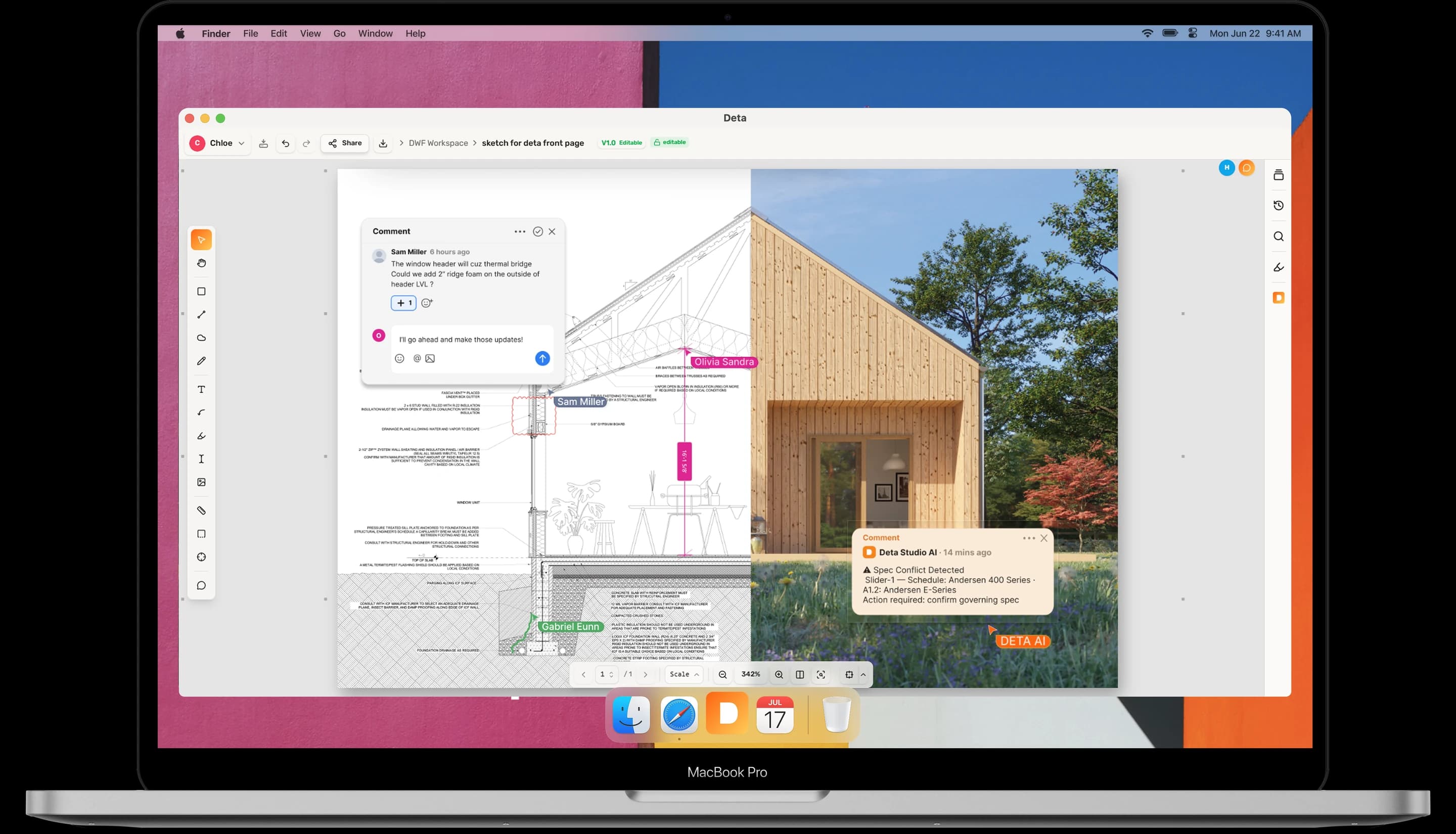
Mark up, measure, review — done.
Deta Studio is the easy way to review drawings. Redline, dimension, and keep every comment tracked — on your computer, with your team, on any device.
Mac & Windows desktop · Cloud in your browser, on iPad & mobile · No credit card required
Everything a review needs.
Nothing it doesn't.
Markup
Mark up as fast as you think.
Fast, precise markup tools for local PDFs and cloud drawings.
Overlay two revisions and every change lights up. Nothing moves on a sheet without you seeing it.
Dimension
Measure once, trust it everywhere.
Calibrated lengths, areas, and counts, right on your drawing.
Calibrate the sheet once, then measure anything — metric or imperial, always to scale.
Whiteboard
An open canvas with real dimensions.
Collect ideas, images, and sketches on a shared, scaled canvas in Deta Cloud.
Drag images, screenshots, and references straight onto the board. No import step — it lands exactly where you drop it.
Collaboration
Connected everywhere you work.
Tables, AI chats, and live collaboration are part of Deta Cloud.
Mac, Windows & mobile
Desktop apps for Mac and Windows. Deta Cloud in your browser, on iPad, and on your phone.
Local, no internet needed
Open, mark up, and save PDFs on your computer, even offline.
Real-time cloud collaboration
Review a cloud drawing together and see each markup as it happens.
Linked to Drive & Dropbox
Import PDFs from Google Drive or Dropbox, then save your annotated PDF back.
Simple pricing, for everyone.
Own the desktop app with a one-time license. Start with Cloud Free, or choose a paid plan for higher limits.
Desktop license
Local PDFs. Yours to keep.
- Mark up, measure, and compare local PDFs on Mac and Windows.
- Pay once. Includes one year of new desktop features.
Deta Cloud
In your browser or desktop app.
- Shared drawings, live collaboration, whiteboards, tables, and AI chats.
- Start with Cloud Free. Pro and Studio offer higher limits.
Desktop app
Permanent license for Mac and Windows.
30-day free trial · no credit card- Runs locally on your computer
- All local PDF tools included
- Pay once, keep it forever
- Includes 1 year of new desktop features
- Cloud Free in the desktop app or browser
Cloud Free
Cloud features, with free plan limits.
No credit card required- 1 workspace
- 3 members per workspace
- 5 documents
- 3 integrations
- Tables and AI chats
- 50 AI credits / month
- 30-day desktop app trial
Cloud Pro
Billed annually
For individuals who live in the cloud.
- Unlimited workspaces
- 3 members per workspace
- Unlimited documents
- Unlimited integrations
- Tables and AI chats
- 200 AI credits / month
- Desktop access while subscribed
Cloud Studio
Billed annually
Billed to the company, from 3 seats.
Each seat goes to one person.
- Unlimited workspaces
- Each seat gets full Pro features
- 400 AI credits / seat / month (2x Pro)
- Desktop app included with every seat
Made for the people
who live in drawings.
Sketch over drawings, collect references on a scaled whiteboard, and turn feedback into a clear list of what changes next.
Redline sheets, cloud revisions, and keep every consultant comment tracked to resolution — from schematic design to CDs.
Measure, count, and take off quantities straight from the drawing — and review the same set on site, with or without internet.
Education
Educators and students
get the desktop license for free.
Teaching or studying architecture, engineering, or construction? Email us from your school address for a free permanent desktop license.
Email us — hello@deta.studioFAQ
Frequently asked questions
What does the permanent license include?
The permanent license is a one-time purchase that never expires. Use all the local PDF tools on your Mac or Windows computer, fully offline. It includes new desktop features released in your first year; after that, Deta keeps working and getting fixes, and later desktop features may need an upgrade at a discount for license holders. You can also use Deta Cloud Free, including tables and AI chats. Try the desktop app free for 30 days first.
Do I need a subscription to use Deta?
No. A permanent license lets you use the local PDF tools without a subscription. Tables, AI chats, and live collaboration are part of Deta Cloud. Start with Cloud Free, which includes a monthly AI-credit allowance, and upgrade when you need higher limits.
Is Deta free for students and educators?
Yes. Educators and students get the desktop license for free. Email us at hello@deta.studio from your school email address and we will send you a free license.
Can Deta sync with Google Drive and Dropbox?
Yes. Deta Cloud connects directly to your Google Drive and Dropbox accounts. Open and mark up your PDFs, then use Save or Save As Copy to send the annotated file back.
What markup tools does Deta have?
Deta includes a full AEC markup toolset: redlines, highlights, comments, callouts, and freehand drawing. Deta Cloud also includes a whiteboard canvas for collaborative sketching.
How does version control work?
Deta Cloud keeps a version history for your drawings. When Deta detects an updated file in Dropbox or Google Drive, it imports the new version and preserves earlier revisions and their markup notes.
Does Deta work on iPad and mobile?
Yes. Deta Cloud runs in any modern browser on Mac, Windows, iPad, and mobile devices. No app download required.
Can I measure directly on drawings?
Yes. Deta includes calibrated measurement tools for length, area, perimeter, and count, with full metric and imperial scale support.
Is there a file size limit? Can Deta handle large construction drawing sets?
Yes. Deta supports multipage construction drawing sets in the desktop app and Deta Cloud. Files imported from Google Drive or Dropbox can be up to 200 MB.
How is Deta different from Bluebeam or Adobe Acrobat?
Deta is built specifically for AEC drawing review and team collaboration. Use local PDF tools in the Mac and Windows desktop app, or work together in Deta Cloud with shared drawings and Dropbox and Google Drive integration.
Is Deta a Bluebeam alternative that works on Mac?
Yes. Deta has a native Mac app for PDF markup, redlines, measurements, and local PDF comparison. Deta Cloud adds version tracking, team collaboration, and direct Dropbox and Google Drive integration in your browser.
Is Deta a PlanGrid alternative?
Yes. Deta Cloud gives construction teams a shared drawing set with field markup and version history. It connects directly to Dropbox and Google Drive, and works in any browser with no app download required.
Is Deta an Adobe Acrobat alternative for AEC teams?
Yes. Deta offers purpose-built markup and measurement tools for AEC drawing review in its Mac and Windows desktop app. Deta Cloud adds real-time team collaboration and Dropbox and Google Drive integration.
Is there a free plan?
Yes. Cloud Free includes 1 workspace, up to 3 members, and 5 documents, no credit card required.
Can I upgrade or downgrade my plan?
Yes. You can upgrade or downgrade your cloud plan at any time from your account settings. You’ll see the price and when it takes effect before confirming.
Can I cancel my subscription?
Yes. You can cancel at any time from your account settings. You will retain paid access until the end of your current billing period. A permanent desktop license you own keeps working after cancellation.
What payment methods do you accept?
We accept all major credit and debit cards.
Where can I find my invoices?
Your invoices are available under Billing in your account settings. You can download them at any time.